Frigate + Home Assistant: Person, Car, and Package Detection Without a Cloud Subscription!
Cloud cameras charge you monthly to watch your own house. Frigate flips that: real-time person, car, and package detection on your own hardware, wired straight into Home Assistant — no subscription, no footage leaving your network.

If you followed our Swann NVR integration guide, you already know our position on cameras: footage of your home belongs in your home. But recording locally is only half the battle. The feature that makes cloud cameras sticky — "someone is at the door" instead of "a leaf moved" — is smart detection, and the big brands charge monthly for it while your clips sit on their servers.
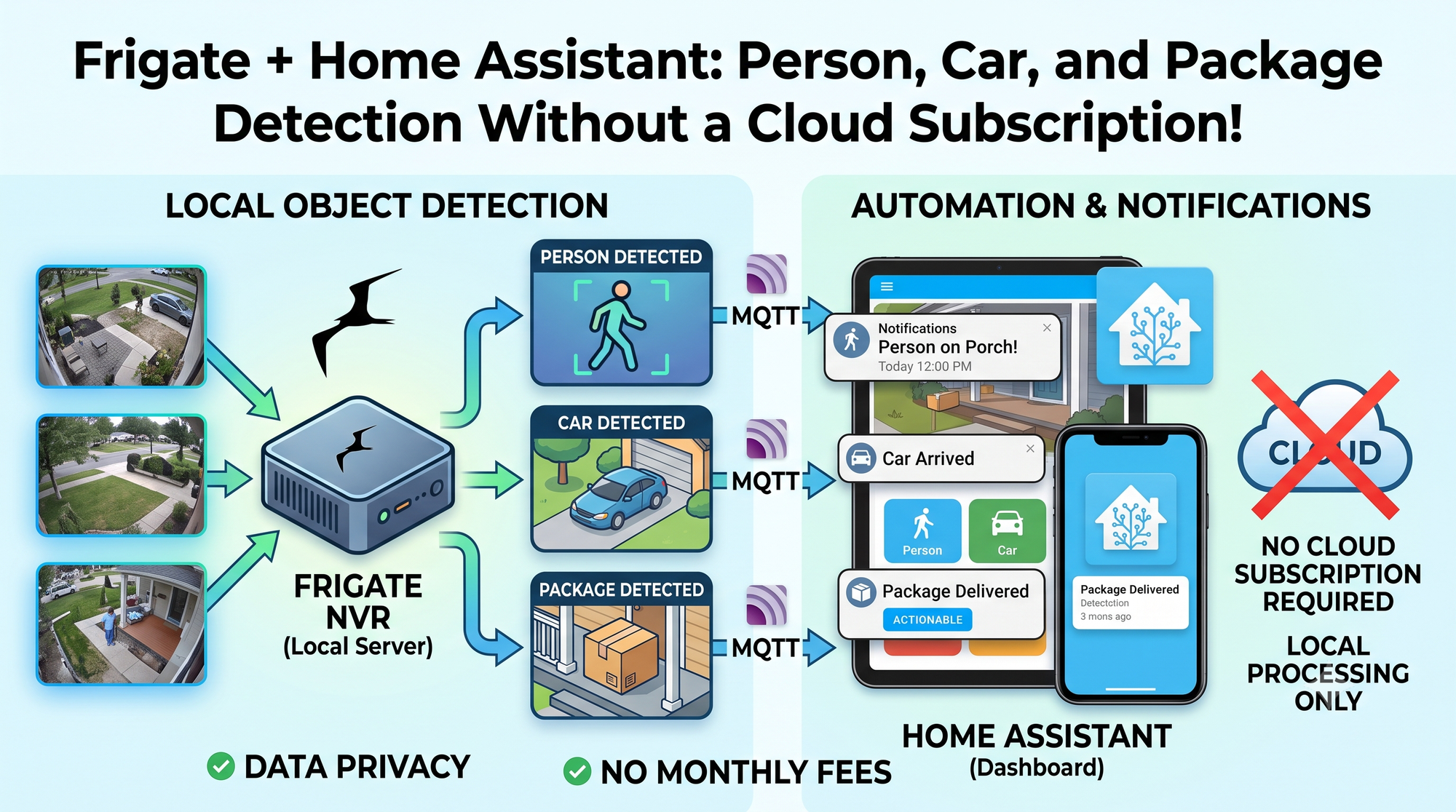
Frigate ends that trade-off. It's an open-source NVR with real-time AI object detection built in: person, car, dog, cat, and (with the right model) packages on the porch — all processed on your own hardware and all integrated with Home Assistant so your automations can react the moment something actually happens. It's the single most requested topic since we announced the AI pillar, and it earns the hype.
How Frigate Works
Frigate watches your cameras' RTSP streams and runs a motion-first pipeline: it only sends areas of motion to the object detector, which keeps CPU use sane. Detections become MQTT events, recordings, and snapshots, and the Home Assistant integration turns all of these into entities you can automate.
The detector is the interesting part. Your options, best-first for most readers:
- Google Coral TPU (~$60): the community favorite — a USB stick that does inference in milliseconds while sipping ~2 watts. One Coral comfortably handles several cameras. (Availability comes and goes; our #9 post covers whether it's still the right buy.)
- OpenVINO on an Intel iGPU: if your NVR box has a modern-ish Intel chip, the iGPU you already own can run detection — no extra hardware.
- Nvidia GPU (TensorRT): overkill for detection alone, but if you have a GPU box from our local AI series, it happily does both.
- CPU-only: works for a camera or two while testing, but don't ship it — detection is precisely what accelerators are for.
What You'll Need
- Cameras that speak RTSP. Most wired PoE cameras (Reolink, Amcrest, Hikvision, Dahua, your Swann NVR's streams) qualify. Cloud-only cameras that don't expose a stream can't be rescued — check before you buy.
- A Docker host — the same home lab box as always. Budget roughly 10–20% of a modern CPU core per camera plus your detector.
- Storage for recordings: a dedicated HDD or SSD; a surveillance-rated drive if you're recording 24/7.
- An MQTT broker — you have one from our MQTT guide already.
Step 1: Docker Compose
services:
  frigate:
    image: ghcr.io/blakeblackshear/frigate:stable
    container_name: frigate
    restart: unless-stopped
    shm_size: "512mb"
    devices:
      - /dev/bus/usb:/dev/bus/usb   # Coral USB
    volumes:
      - ./config:/config
      - /mnt/surveillance:/media/frigate
      - type: tmpfs
        target: /tmp/cache
        tmpfs:
          size: 1000000000
    ports:
      - "8971:8971"   # web UI
      - "8554:8554"   # go2rtc restreams
Two notes from the trenches: shm_size matters (too small = crashes with many cameras) and passing the USB bus through is the standard Coral dance—the same device-passthrough logic from our USB serial passthrough guide applies.
Step 2: The Config That Matters
Frigate's config.yml looks intimidating; you need about this much
mqtt:
  host: 192.168.1.10

detectors:
  coral:
    type: edgetpu
    device: usb

cameras:
  front_door:
    ffmpeg:
      inputs:
        - path: rtsp://user:[email protected]:554/stream1
          roles: [record]
        - path: rtsp://user:[email protected]:554/stream2
          roles: [detect]
    detect:
      width: 1280
      height: 720
    objects:
      track: [person, car, dog]
    record:
      enabled: true
      retain:
        days: 7
The pro move is using each camera's substream for detection and the full-resolution main stream for recording. Detection doesn't need 4K, and this alone is the difference between a struggling box and a bored one.
Zones are the other killer feature: draw a zone over your porch and get an alert on: person in porch_zone instead of "person somewhere in frame." False alarms on the sidewalk are over.
Step 3: Wire It Into Home Assistant
Install the Frigate integration from HACS (you have HACS from our guide), point it at your Frigate URL, and every camera, every tracked object, and every zone appears as entities: occupancy sensors (binary_sensor.front_door_person_occupied), event counts, snapshot images, and live camera feeds.
Then grab the community Frigate notification blueprint — five minutes to rich phone notifications with the detection snapshot, a clip link, and per-zone filtering. This is the moment your DIY setup surpasses the cloud subscription it replaced: "Person at the front door" with a thumbnail, in under two seconds, from hardware you own.
Bonus for the LLM crowd: Pipe Frigate events through a conversation agent and have Piper announce, "someone is at the front door — they're carrying a box" instead of playing a chime. That walkthrough will be in the AI automations post, coming up.
Honest Trade-Offs (You Know the Drill)
- Config lives in YAML. The newer web UI does a lot now, but you will edit a config file. If you survived ESPHome, you'll thrive.
- Camera quality caps detection quality. A 720p camera with night IR bloom will miss things no model can recover. Adjust the camera before blaming Frigate.
- Expect a tuning week. Every install spends a few days adjusting zones, min scores, and object sizes to kill false positives. Budget for it; then it just works.
- 24/7 recording eats discs. 7 days of continuous 4K per camera is real terabytes. Motion/event-only retention is the sane default.
The Bottom Line
Frigate is the poster child for the whole thesis of this blog: take the feature the cloud charges rent for, run it better on hardware you own, and wire it deeper into your home than any subscription service would ever allow. Person detection in your automations, packages announced by name, footage that never leaves the house — for the one-time price of a detector you'll measure in tens of dollars.
How many cameras are you running, and what's your detector — Coral, iGPU, or full GPU? Tell us in the comments!
💡 Affiliate Disclosure: This post contains affiliate links. If you make a purchase through them, I may earn a small commission at no extra cost to you. I only recommend tools and services I actually use and trust.
Join the Conversation: Got questions or ideas for a future build? Drop a comment below—I’d love to hear what you're working on.
Stay Updated: The best way to support the site is to subscribe to the newsletter. You can also still find my video archive over on YouTube. Thanks for reading, and happy building!

Binary Tech Labs
YouTube content creator that provides tech tutorials and reviews on Home Assistant, IoT devices, Raspberry Pi and other Single Board Computers